

Identity Theft in 2026: Why Basic Digital Protection Is No Longer Optional
A practical guide to protecting your identity in the age of AI scams

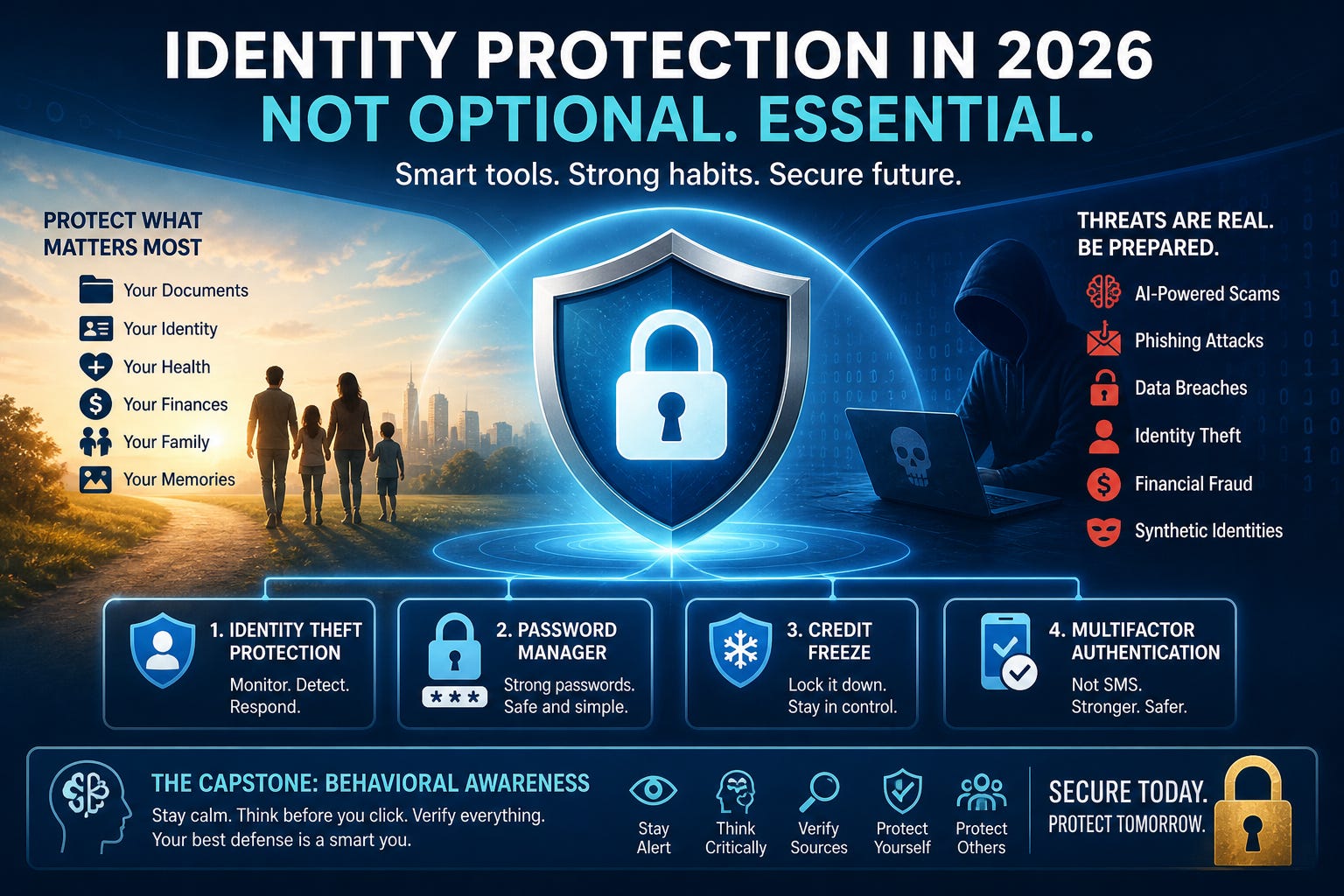
Identity theft protection used to feel optional. Many people treated it like an extra layer of insurance they might look into later. In 2026, that mindset no longer matches reality.
Artificial intelligence has changed the scale and speed of online fraud. Scammers can now clone voices, generate convincing emails in seconds, create fake websites that look nearly identical to legitimate businesses, and automate phishing campaigns at levels that were impossible just a few years ago.
The result is a growing wave of identity theft, account takeovers, financial fraud, and synthetic identity scams that affect everyday people, families, retirees, and businesses alike.
According to Federal Trade Commission data, Americans reported losing more than $12.5 billion to fraud in 2024, with older adults experiencing some of the largest financial losses. Reports involving losses exceeding $10,000 have increased dramatically since 2020. The numbers continue to rise as AI tools become easier for cybercriminals to access.
This is no longer just about protecting a password. It is about protecting your financial identity, your digital reputation, and your ability to recover after an attack.
Why It’s Important
One of the biggest mistakes people make is assuming identity theft only happens after a massive company breach. In reality, many attacks begin with something simple.
A fake package delivery text.
An email pretending to be your bank.
A social media message from a cloned account.
A fake tech support popup.
A phone call that sounds convincing because AI recreated someone’s voice.
Modern scams are designed to create emotional pressure. Fear, urgency, embarrassment, excitement, and confusion are all tools used by hackers and scammers.
That emotional manipulation is why behavioral awareness has become the capstone of digital security.
You can have strong passwords and modern security tools, but if panic causes you to click a fake link or share a verification code with a scammer, those protections can collapse quickly.
The most effective defense today combines technology with disciplined behavior.
At minimum, every person should have these four protections in place:
Identity theft protection.
A password manager.
A credit freeze.
Multifactor authentication that does not rely on SMS text messages.
These are no longer “nice to have” tools. They are the foundation of modern digital security.
What It Is / How It Works
Identity Theft Protection
Identity theft protection services monitor your personal information for signs of misuse. Depending on the provider, this can include monitoring:
• Credit activity.
• Dark web marketplaces.
• Social Security number exposure.
• Address changes.
• Bank account misuse.
• Data breach notifications.
Some services also include recovery specialists who help victims repair damaged accounts, dispute fraudulent charges, and restore their identity after an attack.
Identity theft protection is not a magic shield, but it acts like an early warning system. The faster suspicious activity is detected, the easier recovery becomes.
Password Managers
Most people still reuse passwords across multiple websites. That creates a domino effect.
If one account is breached, attackers immediately try the same email and password combination across banking apps, shopping sites, cloud storage services, and social media accounts.
A password manager solves this problem by generating and storing long, unique passwords for every account.
Instead of remembering dozens of passwords, you only need to remember one strong master password.
A good mental model is this: your password manager becomes a digital vault, while every account gets its own unique key.
Credit Freezes
A credit freeze is one of the most underused security tools available.
When your credit is frozen, lenders cannot open new lines of credit in your name unless you temporarily lift the freeze.
That means even if criminals obtain your Social Security number and other personal information, they may still be blocked from opening fraudulent loans or credit cards.
A freeze is free through the three major credit bureaus:
• Equifax
• Experian
• TransUnion
Many people mistakenly believe a fraud alert is enough. Fraud alerts help, but a credit freeze provides stronger protection.
Multifactor Authentication Beyond SMS
Multifactor authentication, often called MFA, adds another verification step after your password.
The problem is that text message authentication is increasingly vulnerable to SIM swapping attacks, phishing, and account interception.
Whenever possible, use:
• Authentication apps.
• Hardware security keys.
• Passkeys.
All are significantly safer than relying only on SMS codes.
How to Mitigate
Reducing risk in the AI era requires layered protection.
Think of it like securing a house.
A lock helps.
An alarm helps.
Security cameras help.
But awareness about who you open the door for matters just as much.
Here are practical habits that dramatically reduce your exposure to scams:
• Slow down when messages create urgency.
• Never trust caller ID by itself.
• Verify requests using official websites or phone numbers.
• Avoid clicking links in unexpected emails or text messages.
• Keep devices updated with the latest security patches.
• Use separate passwords for every account.
• Review financial statements regularly.
• Freeze your credit before a problem occurs.
• Teach family members how modern scams work.
One growing concern in 2026 is AI generated impersonation attacks.
Scammers can now recreate voices from short social media clips and use them during phone scams targeting family members. Some attacks use deepfake video during fake job interviews or fraudulent business meetings.
That means verification habits matter more than ever.
If a request involves money, sensitive information, or urgent action, pause and independently confirm it.
Want to support my work? Consider buying me a coffee ☕
What You Should Do Starting Today
If you are starting from scratch, here is a practical setup process:
Step 1: Freeze Your Credit
Create accounts with Equifax, Experian, and TransUnion.
Enable a security freeze with each bureau.
Store your PINs or recovery information securely inside your password manager.
Step 2: Set Up a Password Manager
Install your password manager on your phone and computer.
Replace weak or reused passwords with unique passwords generated by the manager.
Start with your:
• Email accounts.
• Banking accounts.
• Cloud storage.
• Shopping accounts.
• Social media accounts.
Your email account should be treated like the master key to your digital life.
Step 3: Enable Strong MFA
Turn on multifactor authentication everywhere possible.
Prefer authenticator apps or passkeys over SMS verification.
Store backup recovery codes offline in a secure location.
Step 4: Build Better Behavioral Habits
This step is often ignored, yet it matters the most.
Before responding to unexpected requests, ask:
• Is this creating fear or urgency?
• Am I being pressured to act quickly?
• Is someone asking me to bypass normal procedures?
• Did this message arrive unexpectedly?
Emotional control is now part of cybersecurity.
Feature Highlight
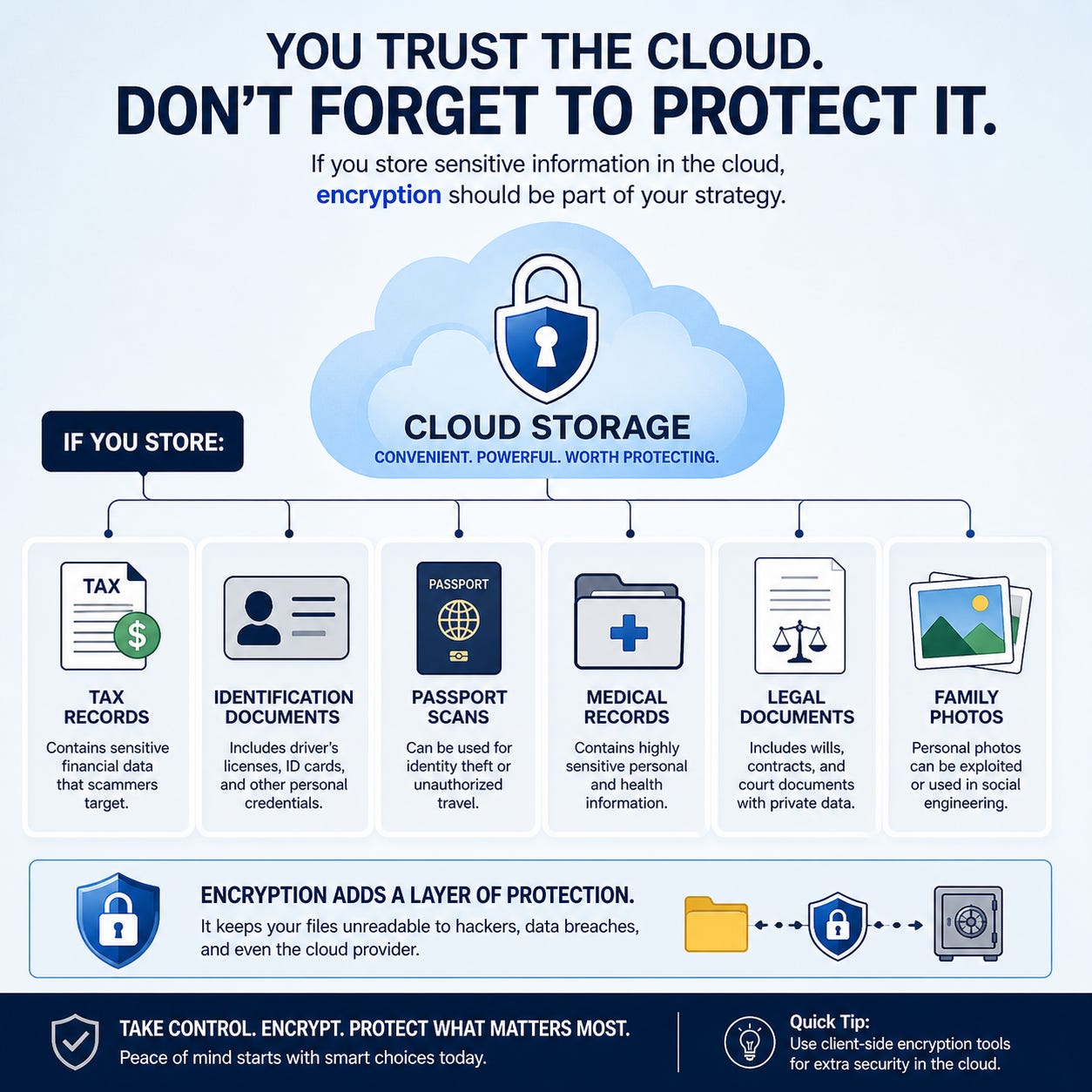
Why Encryption Matters for Cloud Storage
Cloud storage is incredibly useful, but convenience should never replace security.
Many people assume files stored in the cloud are automatically private. That is not always true.
Some cloud providers encrypt files while they travel between your device and their servers, but the provider may still technically have access to the decrypted data.
That is why end-to-end encryption matters.
End-to-end encryption means only you hold the keys needed to read your files. Even if a cloud provider experiences a breach, attackers cannot easily access the contents without your encryption keys.
Think of standard cloud storage like storing belongings in a secured warehouse where management still has a master key.
End-to-end encryption is more like placing your belongings in a personal safe inside that warehouse, where only you control the combination.
Privacy focused storage services such as Proton and Tresorit have gained attention because they prioritize encrypted storage and zero knowledge privacy models.
My Recommendation is Cryptomator
Cryptomator is designed specifically for cloud storage protection. It encrypts your files before they sync to services like:
• Google Drive.
• Dropbox.
• OneDrive.
• iCloud Drive.
Why it stands out:
• Very beginner friendly.
• Automatic file encryption before upload.
• Zero knowledge design helps keep cloud providers from reading your files.
• Works on both Windows and macOS.
Best use case:
If you regularly store personal documents in cloud storage and want simple, frustration free encryption.
Even a simple encrypted archive stored in the cloud provides a meaningful layer of protection against unauthorized access.
Closing encouragement
The reality of digital security in 2026 can feel overwhelming, but strong protection does not require paranoia.
It requires preparation.
Small security improvements made today can prevent enormous financial and emotional damage later.
The goal is not perfection. The goal is resilience.
Cybercriminals often target the easiest opportunities first. Every additional layer of protection makes you a harder target.
Strong passwords, identity monitoring, credit freezes, secure MFA, encrypted storage, and disciplined decision making work together to create a far safer digital life.
Most importantly, remember this:
Scammers succeed when they create emotional reactions faster than people can think critically.
Taking a moment to pause, verify, and slow down may be the single most important cybersecurity habit you can build.
What security habit do you think most people still underestimate in 2026?
References
Federal Trade Commission. “FTC Data Show a More Than Four-Fold Increase in Reports of Impersonation Scammers Stealing Tens and Even Hundreds of Thousands from Older Adults.” Accessed May 2026.
Federal Trade Commission. “False Alarm, Real Scam: How Scammers Are Stealing Older Adults’ Life Savings.” Accessed May 2026.
Federal Trade Commission. “Protecting Older Consumers Report.” Accessed May 2026.
Black Press USA / NNPA Newswire original reporting. Accessed May 2026.
HYPR Security Research on AI-driven authentication and password risks. Accessed May 2026.
National Institute of Standards and Technology (NIST). Digital Identity Guidelines.